Built for NinjaTrader 8

Know your edge before the market tests it.

Backtest risk and journal your NinjaTrader strategies. Strategy Forge turns your NinjaTrader trade exports into a full risk picture: drawdowns, loss-limit lockouts, losing streaks, your best hours and days. Edge Journal keeps a private record of every live trade.

Start for $9/month See the tools
Works with NinjaTrader 8 trade exports Introductory price (regular $29/month). Cancel anytime. Your sheets and journal stay saved.
Strategy Forge
Combined (2) Range TS4 Matrix
Profits$91,202
Profit factor1.20
Win rate74%
Lockout days16
Worst drawdown−$6,473
Losses in a row7
Example: two NinjaTrader backtests combined at $350 risk per trade. Hypothetical results.

A backtest tells you what a strategy made. It rarely tells you what it would have cost you to hold on.

The profit number is the easy part. The questions that blow up evaluations are the others: how deep does the drawdown go at your size, how often does the daily loss limit lock you out, and how many losses come in a row. Algo Edge Lab answers those from your own trade list.

Two tools, one membership

Test the plan. Then keep score of how you trade it.

Strategy Forge

Load one or more backtest exports and see how they would have traded your account, together or one at a time.

  • —Combine several strategies into one account and see how they overlap
  • —Daily loss limit applied trade by trade, with every lockout day counted
  • —Static or percent-of-balance sizing, recalculated per trade, day, week or month
  • —Filter each strategy by entry hour and weekday
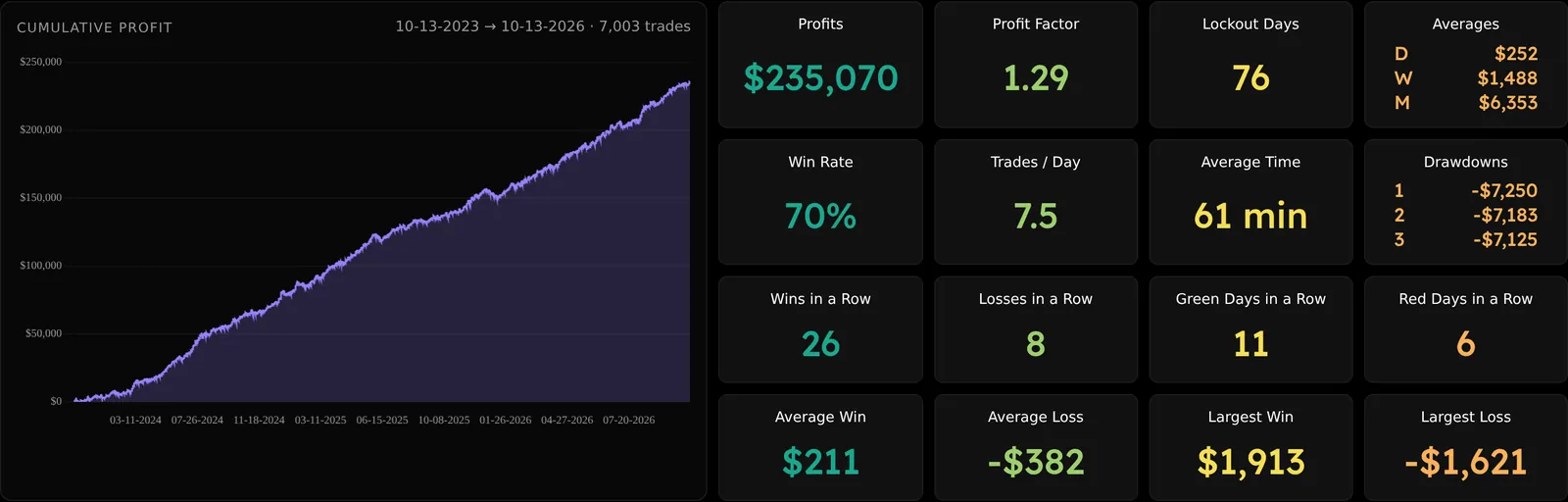
  • —Top three drawdowns, win and loss streaks, green and red day runs
  • —Copy a full summary for an AI review in one click
Edge Journal

Import your live trades and turn each session into something you can learn from, not just a number.

  • —Import NinjaTrader trades; re-imports skip anything already saved
  • —Calendar of daily P&L with weekly totals
  • —A pre-market plan and an end-of-day review for every session
  • —Tag setups and mistakes, and grade your execution A to F
  • —Paste chart screenshots straight onto a trade
  • —See which setups pay and which mistakes cost you the most
Inside the tools

See exactly what you get.

Real screens from Strategy Forge and Edge Journal, loaded with example NinjaTrader backtests. Hypothetical results.

Strategy Forge

Every number that matters, on one screen

Profit, profit factor, lockout days, drawdowns and streaks for one strategy, or several combined into one account.

Strategy Forge: Every number that matters, on one screen
Strategy Forge

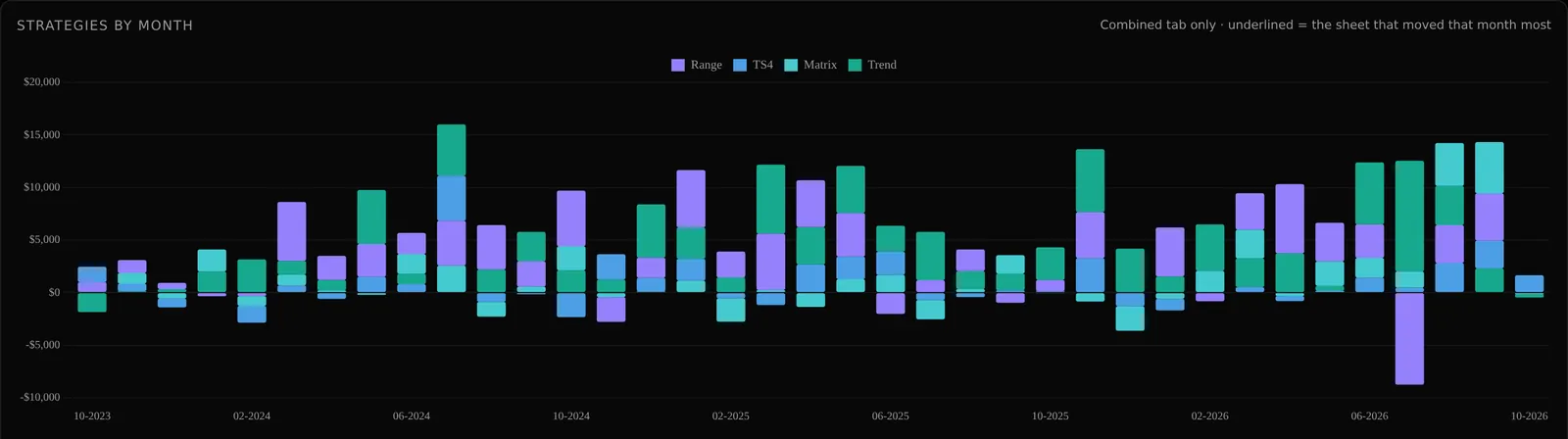
See which strategy carried each month

Each bar is one month, split by strategy and stacked from biggest gain down to biggest loss. Hover a month for the exact numbers.

Strategy Forge: See which strategy carried each month
Strategy Forge

Find your best and worst days

Trades, profit, win rate and share of total profit for every weekday.

Strategy Forge: Find your best and worst days
Strategy Forge

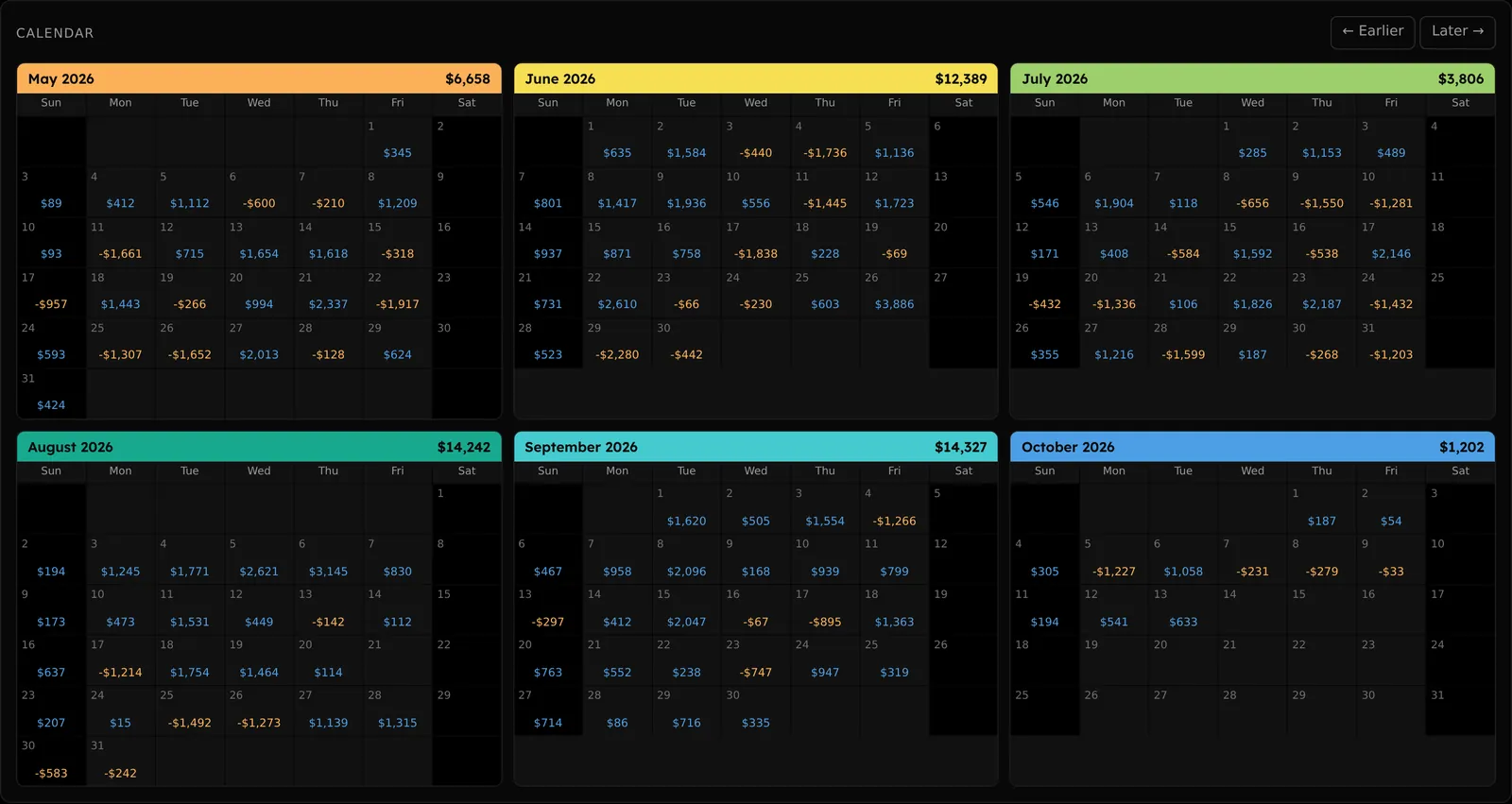
Six months of daily P&L at a glance

Every trading day on a calendar, with the month total up top. Page back through the whole backtest.

Strategy Forge: Six months of daily PandL at a glance
Edge Journal

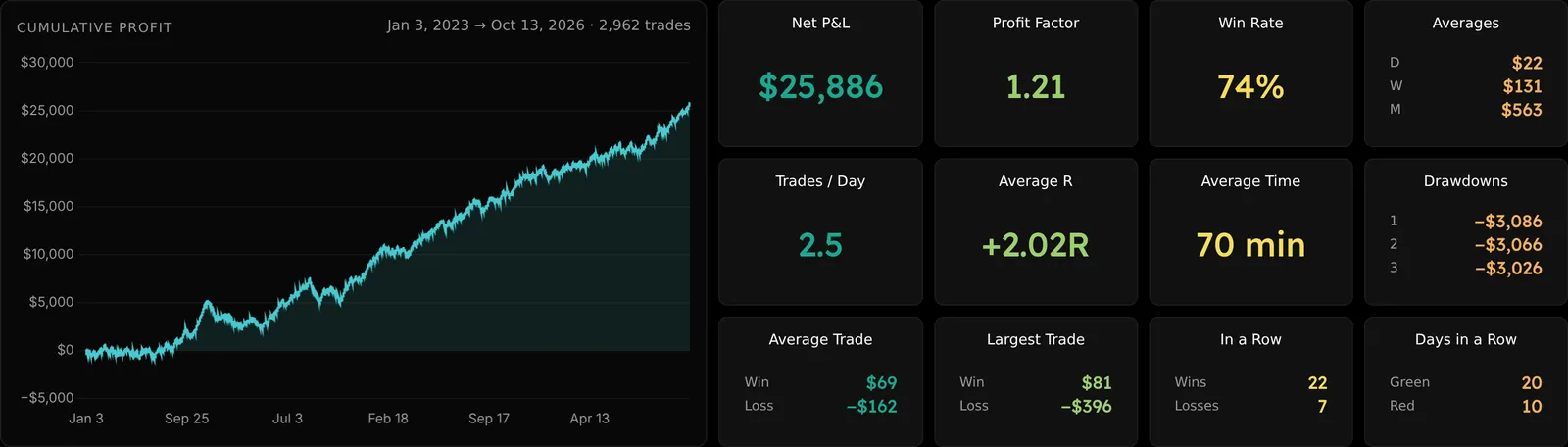
Your live trading, measured the same way

The same scorecard for your real account, plus average R once you log risk. Filter by account, instrument, strategy, side or trade type.

Edge Journal: Your live trading, measured the same way
Edge Journal

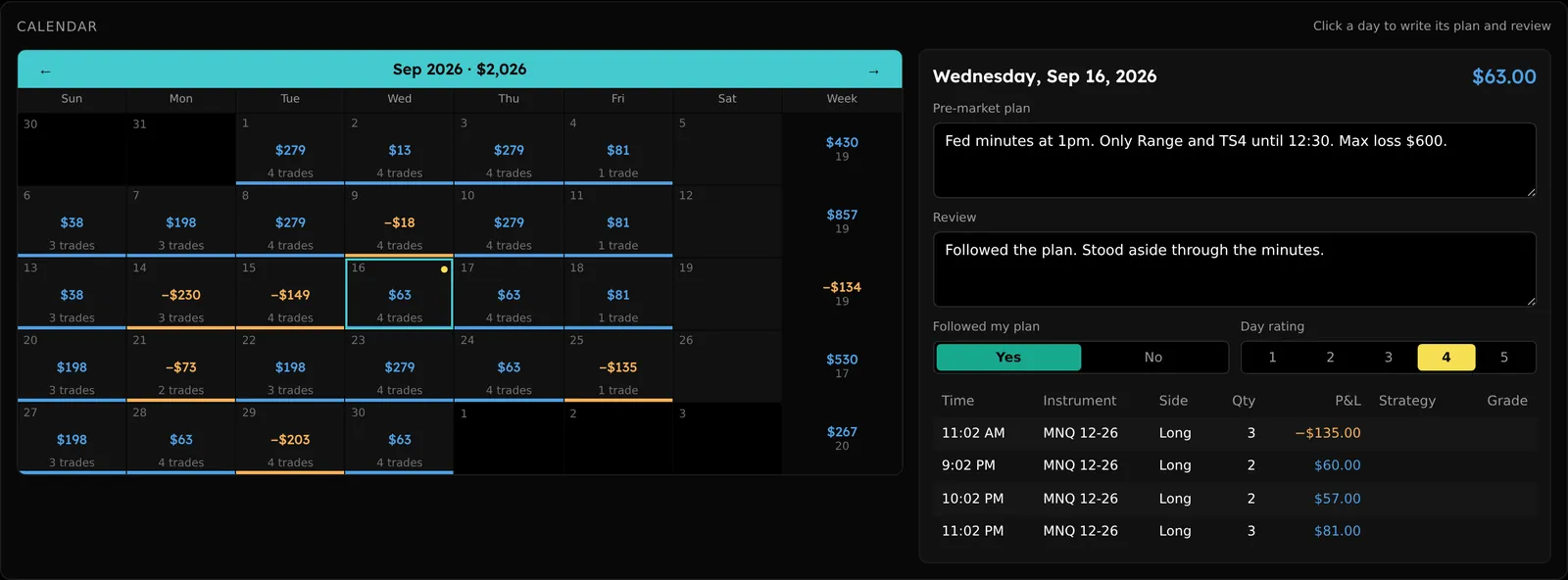
Plan the day, then review it

Click any day to write a pre-market plan and an end-of-day review, mark whether you followed the plan and rate the session.

Edge Journal: Plan the day, then review it
Edge Journal

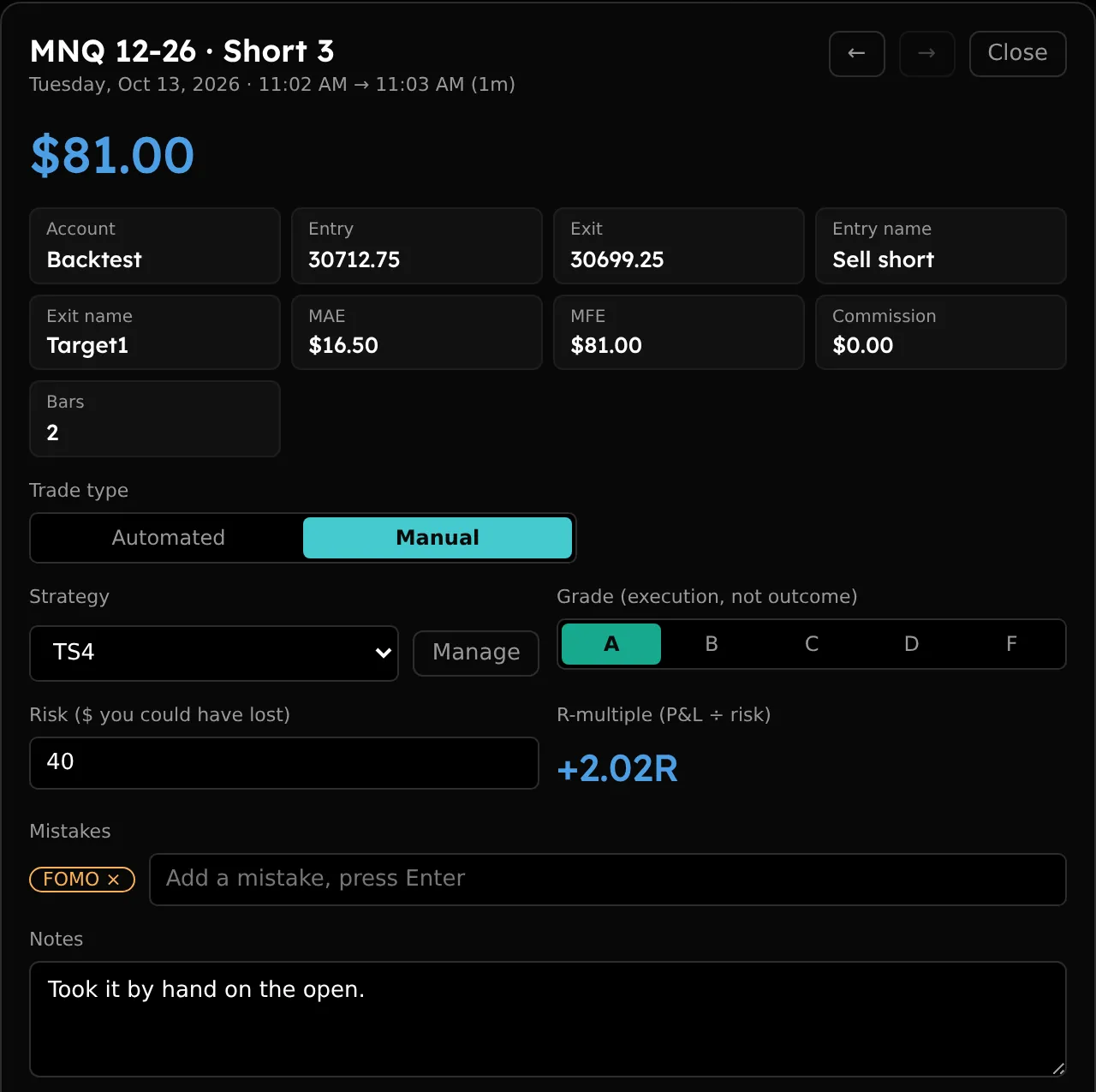
Every trade, tagged and graded

Mark trades automated or manual, attach the strategy and your risk to get R, grade the execution and log the mistakes.

Edge Journal: Every trade, tagged and graded

From NinjaTrader export to answers in a minute.

  1. 01 / Export

    Save your trades from NinjaTrader

    In Strategy Analyzer or Trade Performance, open the Trades tab, right-click, and export to CSV.

  2. 02 / Upload

    Drop the file in

    Each export becomes its own sheet, saved privately to your account and ready the next time you log in.

  3. 03 / Stress-test

    Change the rules, watch the risk

    Adjust risk, sizing and loss limits. Drawdowns, lockouts and streaks update as you type.

Built for evaluations

Numbers that run by your prop firm's rules.

Set your account size, how many accounts you copy to, your daily loss limit and your commission. Strategy Forge replays every trade in order, skips entries that overlap an open trade, and stops the day the moment the loss limit is hit, the way your evaluation would.

Account(s)$50,000 × 1
Risk per trade$350
Daily loss limit$1,200
Commission$1.00 / contract

One membership. Both tools.

Introductory price

Early members pay less while new features are added. Prices go up as the tools grow.

Monthly $9$29/ month 69% off the regular priceBilled monthly
Choose monthly
Save 17%
Annual $90$290/ year 69% off the regular priceWorks out to $7.50/month
Choose yearly
Every plan includes
  • Strategy Forge and Edge Journal
  • Up to 40 saved strategy sheets
  • Unlimited journal trades, notes and screenshots
  • Private to your login
  • Cancel anytime; your data is kept if you come back
Pay by card or PayPal.

Questions

Does it work with platforms other than NinjaTrader?

Right now it reads NinjaTrader trade exports: the Trades tab from Strategy Analyzer or Trade Performance, saved as CSV.

Who can see my trades?

Only you. Your sheets and journal are tied to your login and stored privately.

What happens if I cancel?

You lose access, but nothing is deleted. Rejoin and everything is where you left it.

Is this trading advice?

No. These are analysis tools. What they show depends entirely on your own trade data and settings.